Real Lessons from Claude Code, Codex, and AI Agent Tools
This is a summary of nearly two months of intensive use of Claude Code and Codex. I'm pretty sure something in here will be useful to you, whatever your background.
Even if you have zero technical training and have never touched AI beyond a chat interface, I think this will give you something new. I was exactly that person not long ago.
One thing to be upfront about: Claude Code has done a lot of things for me, but it didn't write this article. Though it did offer edits and suggestions along the way.
How It Started
It all started because I genuinely couldn't stand the mindless searching and boring organizing anymore.
I got interested in startups and started cold-emailing CEOs in March to pitch myself. The process was exactly as tedious as it sounds: go to a VC's website, click through their portfolio one by one, search the CEO's email, write the message, copy everything into a Notion database, paste it into my email client, send. The constant context switching was exhausting.
One day I just couldn't take it anymore. I asked chatgpt for help automating some of it. It suggested n8n. I got a Reddit scraper working, but the full cold-email workflow refused to cooperate no matter what I tried. I was venting to a friend when he said, almost as an aside, "Codex and Claude Code are really powerful now." I tried it out of pure mind(just give it a try anyway): I described my exact workflow to Codex in detail. Six minutes later, it had built something that worked better than what I'd been doing manually.
The feeling was hard to describe. I imagine it's something like what a textile worker felt seeing a spinning jenny for the first time: shock, a little fear, and then one immediate thought: "I really need to understand this." It felt like a watershed moment.
I started hunting for tutorials. Claude Code had far more documentation than Codex since it launched earlier, so that became my entry point into what turned into months of intense exploration.
Exploration
I started throwing everything tedious at these tools to see what stuck.
My meeting notes with my supervisor were never complete enough. I wanted a specific format: direct quotes, highlighted key points, clear next steps. So I had Claude Code lock in an SOP format. Now every meeting produces a perfectly structured note automatically.
Presentation slides were always a headache for me. Using good-looking HTML templates and content I provided, I worked with Claude Code step by step to turn ideas into HTML and then PDF. Claude Code wrote all the code. After many rounds of back and forth, I also locked in an HTML Slide SOP. Now slides can generate automatically.
I had ideas I wanted to track in a database, but opening Notion and clicking through to the right database always took too many steps. So I set up a Telegram bot hosted on Railway: now any idea I have lands in the right Notion database with a single tap. Claude Code wrote all the code.
Before, when I found good content online (say, a YouTube video), I'd copy the transcript, hand it to an AI for a summary, specify the format every time, and paste the result into Obsidian. Now the Obsidian Web Clipper plugin pulls it in automatically. An LLM formats it as a wiki-style note. When I want to go deeper on something, I ask the AI on the spot and update the note based on the answer. Then I use the Feynman method (which I've locked in as a reusable skill) to test whether I actually understood it.
There are so many more examples. The pattern is always the same: have an idea, act on it fast, learn from what breaks.
Lessons Learned
When you experiment enough, you see these tools clearly. They're powerful, but they have real flaws. You won't always get what you want. You have to manage them.
It Only Cares About Right Now
AI solutions have one obvious default: make it work now, worry about nothing else. Long term maintenance isn't on its agenda. It prioritizes the immediate problem over architectural durability every time.
My fix: after getting any proposal for a long-lived project, I now add one follow up: "Is this maintainable long-term? Is there a simpler way to do this?"
Backups Come First
I once read a Reddit thread where someone asked Claude to help with a task, and Claude deleted their entire database. Just gone. You can't watch every action it takes, but you also can't afford to babysit it constantly.
The answer is Git. My Obsidian vault syncs to a private GitHub repo via the official Obsidian Git plugin. Code projects follow the same pattern. If you don't have a development background, you don't need to learn much. One afternoon to understand commit and push is enough. Claude Code wrote my auto-backup scripts.
Never Hand Over Credentials
One thing that genuinely frustrated me: it'll ask for your API key directly in the chat.
Large models aren't well-trained on security, so you have to protect yourself. API tokens, passwords, credentials: none of these belong in a conversation window. Create a .env file yourself and keep sensitive information there.
CLAUDE.md Needs Regular Pruning
The more you use the tool, the more rules and preferences you pile into CLAUDE.md. But once it gets long enough, Claude stops following all of it. There's an effective ceiling on how many instructions it actually processes, and rules you added quickly sometimes contradict the overall logic.
Review it regularly: delete what's outdated, merge what's duplicated, keep it lean. For any configuration file, less is more.
Treat It Like a Junior You Have to Manage
This is the most accurate framing I've found. You have to actively manage it, not just dump a requirement and wait.
My current workflow:
Set a clear goal first. Not "help me do X," but "the goal is Y, it needs to reach Z, and here's what done looks like." A fuzzy goal makes everything downstream useless.
Make it research before building. Most things you want already exist on GitHub or in some community. Search first, reuse if you can, don't start from scratch.
Require a plan before execution. If something genuinely needs to be built, ask for a plan before any code gets written. This looks slow and actually saves time.
Keep progress visible. I have Claude maintain a LOG.md. Each completed step gets a checkmark; errors get logged. I don't need to watch constantly. A quick glance tells me where things stand and whether it's stuck.
Dig into the root cause when it loops. If the same problem comes back three times, stop. Don't ask for another proposed fix. Make it understand the actual problem first. Throwing more solutions at a bug it doesn't understand will not unstick it.
Require verification, not just "done." "Done" doesn't mean done. I now explicitly ask for tests and verification. The result counts only when I see it actually run.
Lock working patterns into SOPs. Every time I solve a new type of problem, I run a quick retrospective with Claude and write the outcome into an SOP in Obsidian. Next time a similar situation comes up, I hand it the SOP. No re-explaining from scratch.
Resource Recommendations
If you don't want to hunt these down yourself, I've organized everything into a categorized database. Claude Code organized it, naturally.
Tool Resource Library (Categorized)
A few worth calling out:
Superpowers Skills: a skill pack for Claude Code with built-in workflows for brainstorming, task decomposition, and execution planning. Having a structured approach beats having none.
Claude Mem: cross session memory. By default Claude starts fresh in every conversation. This changes that.
Context Mode: automatically manages context, extracts relevant information, saves it locally, reduces token usage, and keeps Claude better oriented to the current task.
Agent Style: an English writing ruleset that strips passive voice and AI-register patterns from Claude's default output.
Typeless and Wispr Flow are both my referral links. Not sponsored. Both give a free month to new users. Neither is a simple transcription tool. Both strip filler words, restructure content on the fly, and handle mixed-language input well.
Wispr Flow runs globally on Mac with a lighter footprint. Typeless does more active work: it takes scattered speech and organizes it into coherent, structured text. The tradeoff is price. I currently prefer Typeless, though Wispr Flow is a solid alternative. I've tried other tools too, and once you've used the better ones, the gap is immediately obvious. Voice input alone can meaningfully lift your output.
On Cost
I started on the Pro plan ($20/month). I found myself constantly checking the usage dashboard, watching the remaining quota, occasionally hitting the 5-hour cap. Eventually I upgraded to Max. I haven't looked at those numbers since.
That said, you don't need Max from the start. Codex's free tier is generous. The exploratory phase is totally manageable on free tiers. If Claude Code later becomes your primary tool, Max starts making sense on its own: your quota directly limits your output, and the ROI is high.
What I'd Leave You With
AI hasn't reduced my screen time. If anything I spend more time at my computer now.
What it changed is how learning feels. Before, it had real friction: no immediate feedback, no way to know if I'd actually understood something, constant page-switching and copy-pasting. Now I ask anything I don't understand on the spot, update my notes after understanding it, and test with the Feynman method. The whole chain connects without ever leaving the current page.
The other shift: ideas move from thought to action much faster. Before, getting from "I want to do this" to actually doing it meant crossing a lot of terrain. Now I just talk to Claude: can this be built, has someone already done it, what are the steps? Then I start. That loop is genuinely addictive.
One thing that used to stress me out: this space moves fast. For a while I felt perpetually behind, finishing one tutorial only to see the creator post an update. I've made peace with that. Anxiety helps nothing, and most of the latest features are still being iterated on anyway. What actually compounds over time is more fundamental: engineering thinking, management thinking, and making your workflows repeatable.
The principle I hold onto most is that workflows should be portable. Claude Code is excellent, but all your data and configuration lives on Claude's platform. If Claude stops being the dominant tool someday, you need to be able to move your whole workflow somewhere else. That's why I keep every preference, SOP, and writing style documented in my own Obsidian vault. When I eventually switch tools, I give the new AI these files to read. It learns who I am and what I want. The tools will change. What you've built for yourself stays yours.
This is the best of times. I still believe that. Keep exploring as always.
这篇我会当作一个总结性的大合集文章,讲述我这不到两个月高强度使用Claude Code和Codex工具的体验和经验,我相信这其中一定有内容能对大家有所帮助。
哪怕你不是技术背景,也对AI 除了聊天界面之外一无所知,我也相信这会给予你新的启发,因为我曾经就是这样。
虽然我讲了很多事情都是Claude Code帮我做的,但这篇文章不是。不过它有给一些修改和建议。
缘起
这一切来源于我真的受够了毫无意义的搜索和整理工作。
我对startup很感兴趣,于是在今年3月开始cold email 给CEO pitch我自己。具体就是去VC官网一个一个去看它们投资的公司,再去找CEO邮件,再写邮件整理到notion数据库,复制粘贴到邮件里发送,这整个过程其实是非常耗费时间的,尤其要切换很多页面,整个过程又很枯燥没有任何成长性可言。
有一天我实在受不了想要自动化一部分,于是问了AI网页版,它推荐了n8n(另一个自动化的工具),我尝试了一下搭建了一个自动抓取reddit帖子的流程,但整个cold email的过程没能搭建成功,和朋友吐槽时他说了一句“codex 和 claude code现在很强大“,我抱着死马当活马医的心态,详细向codex描述了我如何操作的流程,它6分钟做出来了甚至比我手动做得好多了。
当时就是一整个仿佛纺织工人看见珍妮机的感受一样,震撼害怕,下一个念头就是这个工具我一定要会了。这真的会是划时代的事件。
接着我就开始搜索教程,发现claude code的教程比codex多多了(推出时间更早),于是我就开始了疯狂的探索期。
探索
于是我就开始尝试把生活中一切我觉得无聊耗时间的事情可以优化的全部优化了,有什么想法完全就是和AI聊然后试验。
比如和导师会议来不及把所有笔记记住,于是用AI总结,虽然这个也有会议自带总结但我希望是我想要的特定格式,比如有导师原话;有高亮;有下一步的指导等等,所以我会让Claude Code固定SOP格式,每次都是自动的完美的笔记。
比如做Pre Slide一直是我的头疼事情,于是用AI借助好看的HTML模版,借助其源码和我提供的内容,一步一步做成HTML再转成PDF,其中代码改写都是Claude Code写的,在这个过程有很多来回的修改,于是我又固定了HTML Slide的SOP模版。下次就是自动的Slide生成了。
比如我有很多想法想要数据库的形式总结整理,但是每次都要打开notion点击好几次才能转到相应的数据库,于是我设置了telegram bot托管到railway,这样我每次有什么想法只需要点进telegram输出,只用点击一次,就会自动出现在对应的notion数据库中。其中所有的代码同样也是claude code写的。
比如网上看见好的知识(例如youtube视频)之前我需要复制脚本,交给AI总结,每次还要告诉我想要的格式,再复制粘贴到obsidian,现在我只需要用obsidian web clipper插件自动出现在obsidian,再利用LLM wiki格式总结笔记,如果我想要学习,就直接问AI问题,基于回答再更新笔记。之后再用费曼学习法(我固定成了skill),来检验我的学习。
有太多太多了,所有的都是一个想法然后迅速实践,之后总结经验教训。
以上所有都有相应的SOP笔记记录在我的个人网站(目前还在完善中):https://navi-liart-nine.vercel.app/
经验教训
当你尝试足够多时,你就发现工具虽然强大,也有很多缺点。不是每一次都能提到想要的结果,你需要去管理它。
它只关心现在
AI给方案有一个很明显的特点:它只关心"现在能跑",不关心"半年后你还能不能维护",一定也不长期主义。
它的设计逻辑就是这样,它优先解决眼前的问题,而不是帮你规划长期的架构。所以我现在如果是长期任务每次让它给方案之后,都会加一句:"这个方案长期可以维护吗?有没有更简洁的实现方式?"
备份NO.1
我在Reddit上看过一个帖子,有人让Claude帮他干活,Claude直接把他的数据库清空了。删了就是真的删了,找不回来。但你又不可能实时盯着它的每一步操作,那还不如自己干了。所以备份很重要。
我现在的做法是用Git做版本控制。Obsidian用官方的Git插件自动同步到私有GitHub仓库,代码项目也是同理。如果你不是开发背景,也不需要学很多,一个下午弄懂基本的commit和push就够了,自动备份脚本是Claude Code帮写的。
隐私绝对不给权限
它有一个让我非常无语的毛病:它会直接在对话里问你要API key。
大模型在安全方面的训练是不足的,所以你只能自己保护自己。任何API token、密码、凭证,绝对不能出现在对话框里。正确的做法是自己创建一个.env文件,把所有敏感信息存在里面。这是一条我觉得无论如何都要守住的原则。
CLAUDE.md 要定期清理
随着你用得越来越多,你会不断把新的规则和偏好加进CLAUDE.md。但它太长了之后,Claude并不会完全遵守,它实际能有效处理的行数是有上限的,而且你临时加进去的规则有时候和整体逻辑是矛盾的。
所以要定期去review,删掉过时的,合并重复的,让它保持精简。对任何配置来说,less is more。
把它当成需要管理的 junior
这是我目前觉得最准确的一个比喻。你需要主动去管理它,而不是丢一个需求进去等结果。
我现在的工作流大概是这样的:
先设定清晰目标 — 不是"帮我做X",而是"目标是Y,希望它能达到Z,验收标准是这样的"。目标模糊的话,后面所有步骤都没什么用。
让它先调研 — 很多你想要的东西,GitHub或者社区里已经有人做了。先搜,能复用就复用,不要从零开始。
做一个计划 — 如果确实需要从头做,让它先出一个计划,而不是直接动手。这步看起来慢,实际上省时间。
进度要可见 — 我会让Claude维护一个LOG.md,每完成一步就打勾,遇到报错也记录进去。这样我不用一直盯着,随时瞥一眼就知道它在哪个阶段、有没有卡住。
追问根因 — 如果同一个问题来来回回三次还解决不了,停下来。不要继续让它给方案,先让它把问题本身搞清楚,再找解决方法。一直让它试方案,它死活也改不了那个bug。
要求验证 — 它说"做好了"不代表真的好了。我现在会明确要求它写测试、跑验证,看到实际跑通的结果才算数。
复盘固化成SOP — 每次解决了一个新类型的问题,我都会和它一起复盘,总结成SOP存进Obsidian。下次遇到类似场景,直接把SOP丢给它读,不用再从头沟通一遍。
SOP示例结构如下:
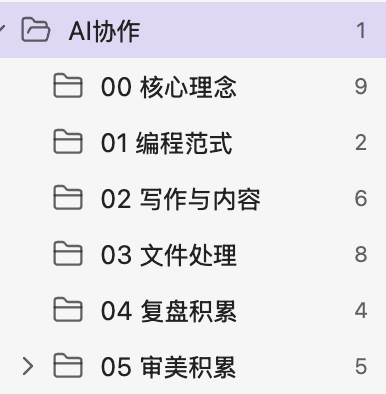
资源推荐
懒得一个一个找的话,我把常用的工具和资源都整理进了一个分类数据库,直接点进去按类型找(当然这也是Claude code帮我整理的):
以下是几个我觉得值得单独说的:
Superpowers Skills — Claude Code的skill包,内置头脑风暴、任务拆解、执行计划等workflow。我会觉得很有帮助,有系统性的计划比没有好得多。
Claude Mem — 跨会话记忆系统。默认情况下Claude每次对话都是全新的,有了这个它才能真正记住你。
Context Mode — 自动管理context,提取有效信息存进本地,节省token,让它更好地理解当前任务。
Agent Style — 英文写作规则集,去掉Claude默认输出的被动语态和AI味。
Typeless 和 Wispr Flow(两个都是我的referral链接,非广告,双方都可以免费一个月)。两者都不只是简单转录,会自动去掉语气词、整理结构,中英混说也能识别。
Wispr Flow 在 Mac 上全局可用,嵌入感更轻;Typeless 的整理能力更强,会主动帮你把一段散话归纳成结构化文字,缺点是贵。目前我还是更喜欢 Typeless,但 Wispr Flow 作为平替也可以。我也试过国产平替,效果真的不OK,用过好的就知道什么是做的不够好了。语音转录真的能让生产力同样提升一大截。
关于费用
我最开始用的是Pro(20美元/月),然后就会发现自己经常去看usage界面,算还剩多少额度,有时候会把5小时的限制用完。后来实在受不了,升级到了Max,现在完全不用再看这些数字了。
但这并不是说你一开始就需要Max。Codex的免费额度比Claude多很多,国产模型的额度也更充裕,探索期完全够用。如果你后来把Claude Code作为主力工具,我会觉得上Max是迟早的事,因为额度直接和你的生产效率挂钩,ROI非常高。
最后想说的
AI没有帮我减少电脑使用时间。反而我用电脑的时间反而越来越长了。
它让学习这件事对我来说变得有意思了。以前学东西对我来说摩擦力很大,没有及时反馈,理解了也不知道理解对不对,还要来回切换页面复制粘贴。现在是有任何不懂的当场就能问,理解之后直接更新笔记,再用费曼学习法验证一遍,整个链路是打通的,完全不用离开当前页面。
还有一件事:想法落地的周期变得非常快了。以前有一个想法,从"想做"到"真的去做"中间要翻很多山。现在是有想法就直接和Claude聊,能不能实现、有没有人已经做了、需要什么步骤,然后就开始了。这种完全上瘾。
当然也有我头疼的,这个领域更新速度太快了。我曾经有一段时间非常焦虑,感觉自己永远学不完,刚看完一个教程,博主又更新了。后来慢慢想明白了:焦虑没有任何用,而且大部分最新功能其实还在迭代,未必是你马上需要的东西。更基础的工程思维、管理思维、以及把工作流SOP化,这些反而是真正能沉淀下来的东西。
还有一点,也是我现在越来越在意的:工作流要可迁移。Claude Code很好用,但它所有的数据和配置都绑在Claude的平台上。如果有一天Claude不再是主流,你需要能把整套工作流迁移到别的工具上。这也是为什么我会把所有的偏好、SOP、写作风格等等所有都记录在自己的Obsidian里,有一天换了工具,让新的AI读一遍这些文件,它就能完全get到我是什么样的人、想要什么样的输出。
工具会换,但自己的积累永远都是自己的。
如果有任何人对 AI 协作、AI Agent 工具,或者任何你感兴趣的内容想和我聊聊,我非常愿意也非常欢迎。哪怕这些内容和 AI 没有任何关系也没关系,因为我本身也不是技术背景,也不是专门做 AI 协作的。
我蛮喜欢和不同背景的人产生一些连接,也很享受这个过程。所以 if you want,直接问我就可以了。
这是最好的时代也是最坏的时代,但我还是觉得这是最好的时代。希望可以不断探索,不断进步。